
Unit 1 · Project 1Completed
Digital Mood Board
A mood board is a designer's first step — it's how you figure out your visual voice before you start making anything. You'll collect images, color swatches, textures, patterns, and typography that feel like YOU. Think about your favorite colors, the art styles you're drawn to, the places and things that inspire you. This isn't about copying — it's about discovering what your eye is naturally attracted to so you can build a consistent personal aesthetic.
Objectives
- 1Identify your personal color palette (3–5 colors)
- 2Collect at least 12 images that represent your aesthetic
- 3Organize images by theme or mood
- 4Write a 2–3 sentence artist statement describing your visual identity
Materials
- Computer with internet access
- Adobe Express or Canva account
- Google Slides (backup option)
- Inspiration sources: Pinterest, Behance, Dribbble, museum websites
Tips & Techniques
1Don't overthink it — go with your gut on what looks good to you
2Look beyond just art: fashion, architecture, nature, and food photography all count
3Aim for variety in your sources but consistency in mood
4Save high-resolution images so your board looks crisp
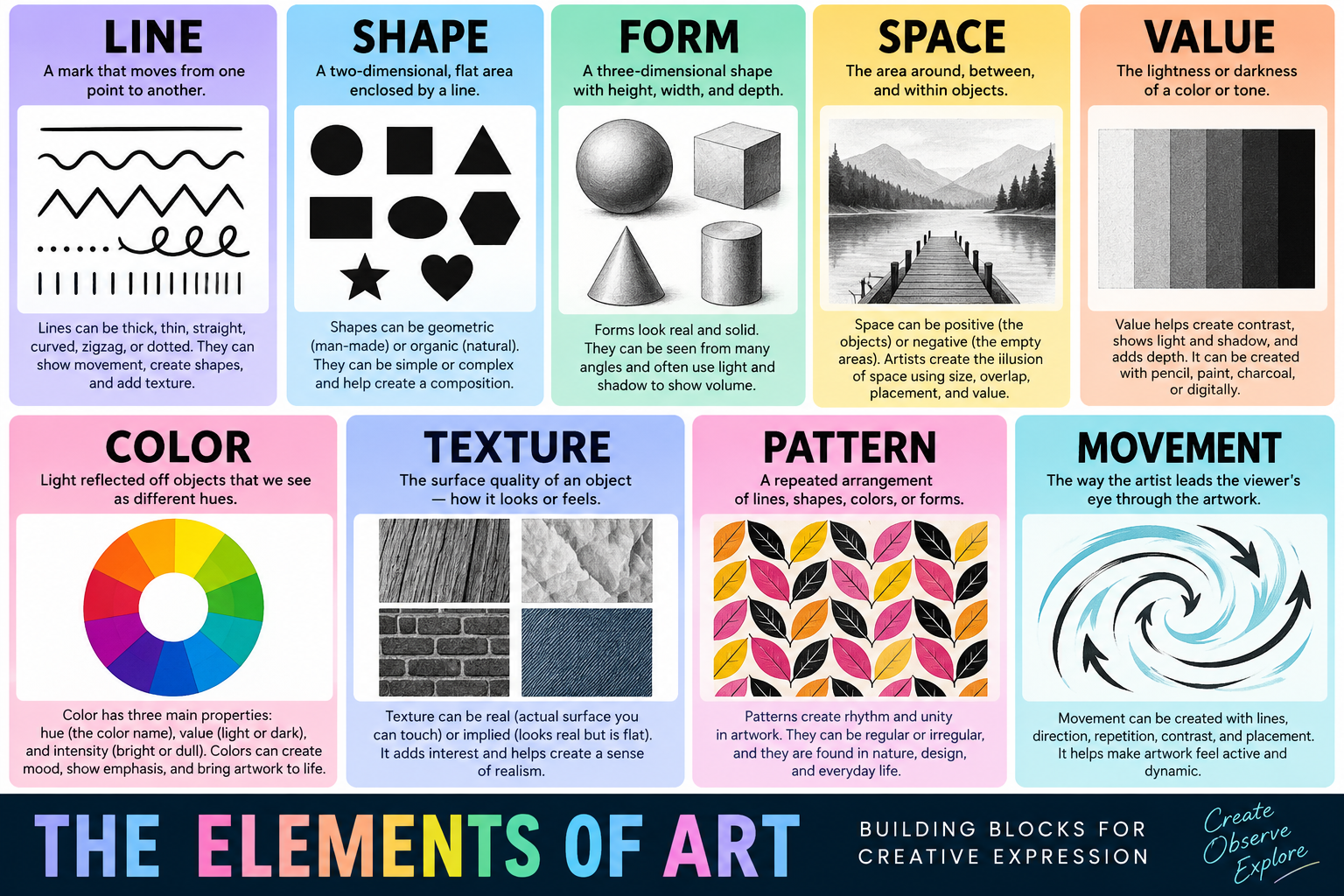
Reference: Elements of Art
Lesson Videos
Introduction to the Elements of Art
12 minAn overview of line, shape, form, value, color, texture, and space — the building blocks of all visual design.